Everything BrewGig does, and what each part is for

Six pillars, one account, one set of numbers. Open any of them for the full case — what it records, which plan it needs, and where the figure it produces comes from.

  • Automatic mileage tracking

    Background GPS mileage tracking with no manual start: drives are detected, measured and logged by themselves, on Pro and above.

    • On Pro and above, automatic trip detection opens each drive as it begins and closes it where the vehicle parked — phone in your pocket, screen locked, nothing to press.
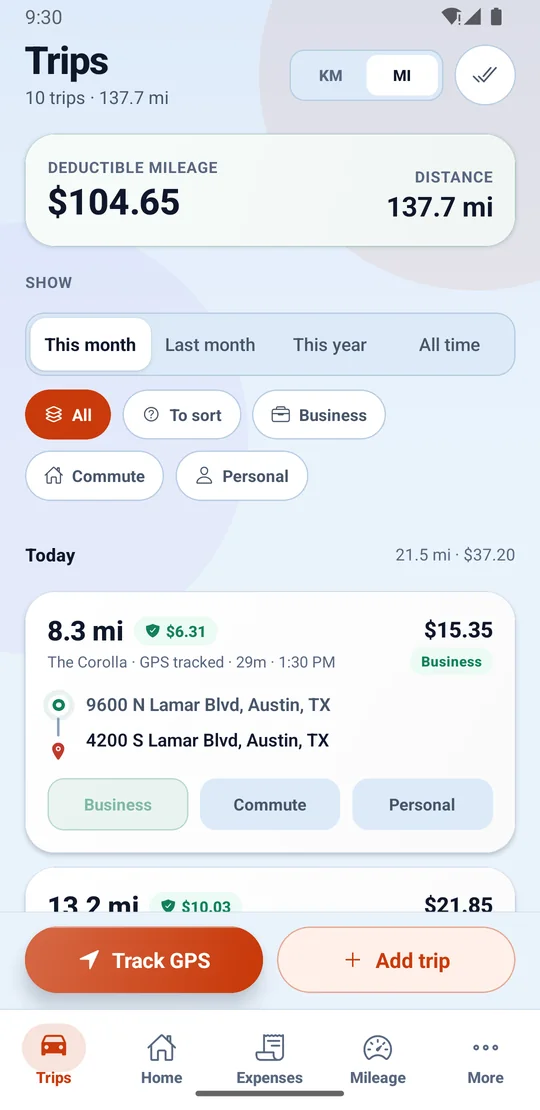
    • Business, Private and Mixed modes classify driving as business or personal as it happens, and one swipe files anything left unsorted.
    • Every trip keeps its own record — start, end, distance and the route driven — which is what a mileage log for the IRS or HMRC has to carry.

    Automatic mileage tracking in full
  • Earnings and invoices

    Every platform and client in one ledger — and BrewGig turns finished work into branded PDF invoices on Premium.

    • Record what each job, trip or shift paid, tips included, while the number is still in your head.
    • Log work as tasks against clients and see who still owes you, before it gets awkward.
    • Earnings per platform side by side — the total no single app’s dashboard can show you.
    Earnings and invoices in full
  • Expenses and receipts

    Photograph the receipt straight onto the expense, and fuel keeps its own log beside what the vehicle earns.

    • Receipts are stored privately and attached for good, never loose in a glovebox.
    • Fuel fill-ups get their own log, so the running cost of the vehicle stays visible.
    • Deductible costs accumulate through the year instead of being hunted through statements in April.
    Expenses and receipts in full
  • Tax estimates

    BrewGig estimates tax on your real tax year, with mileage and expenses already deducted.

    • Estimates follow the actual tax year — April to April in the UK, for example — not a calendar assumption.
    • Quarterly or instalment schedules appear where your jurisdiction uses them.
    • It is an estimate to plan and set money aside with, and it says so — never a filing, never tax advice.
    Tax estimates in full
  • Goals and insights

    Daily to yearly targets with honest pacing — and per-platform analytics in Insights on Premium.

    • A pacing dashboard says whether today is ahead or behind, every day you work.
    • A 7-day trend keeps the week honest — one good Friday cannot hide a slow Tuesday.
    • Per-platform, per-hour and per-trip analytics live in Insights on Premium.
    Goals and insights in full
  • Your records, yours

    Excel export on every plan, CSV import from Pro, row-level security everywhere, and deletion that deletes.

    • A formatted workbook of everything you have logged, on the free plan too — leaving is never the expensive option.
    • Row-level security is on for every table, and receipt images live in a private bucket served through short-lived links.
    • Closing your account erases your records; what survives is a one-way fingerprint of your email and nothing readable.
    Your records, yours in full

Built for how you work

Gig work is not one job. Whether yours arrives by app, by email or by both at once, the records land in the same account — and the parts you do not need simply stay out of the way.

  • Drivers & couriers

    The driving is the job, so the log keeps itself, on Pro and above.

    • Automatic GPS tracking on Pro and above — phone in pocket, screen locked
    • Business, Private and Mixed modes to match the shift
    • Earnings and tips on each trip, beside its deduction value
  • Freelancers & client work

    From brief to bank, with the paper trail intact.

    • Tasks logged against the clients they serve
    • Finished work becomes a branded PDF invoice, on Premium
    • Reminders chase unpaid work so you do not have to
  • Multi-platform hustlers

    Many apps, one ledger — your business is the sum.

    • Work from every platform lands in one place
    • Per-platform analytics on Premium show which apps actually pay
    • Every amount keeps its own currency
  • Everyone at tax time

    Kept all year, so April is an export, not an excavation.

    • Estimates on your country’s real tax year
    • Mileage and expense deductions counted in
    • Excel export on every plan, branded PDF reports on paid plans

The plumbing that keeps your records complete

Mileage, money in, money out, tax and goals all read from one set of numbers. These are the small features that make sure nothing you meant to log goes missing.

  • Reminders you can act on

    Task due dates, unpaid-work nudges and “add what this trip earned” land in an in-app inbox, and as device notifications from the Android app — and every topic can be silenced on its own.

  • More than one currency

    Every amount carries its own currency and is formatted for it, so working across borders never mangles a record.

  • Drives log themselves, on Pro and above

    Automatic tracking is the Android app’s job, and the app is on Google Play. Everything else runs in the browser too, on the same account.

    Get it on Google Play
  • Bring your history with you

    CSV import, included from Pro, with automatic column matching and a row-by-row preview, so the records you already keep come in cleanly.

Your log starts with the next drive.

Install BrewGig, allow location access, and drive. On Pro and above your first trip appears on its own, with its deductible value already worked out.

The Trips screen for a month, with deductible mileage and total distance at the top, filters for business, commute and personal, and a GPS-tracked trip showing its distance, deductible value, vehicle, start and end addresses and one-tap Business, Commute or Personal buttons.