Features · Earnings and invoices

Every platform’s earnings — and invoices that get you paid

Gig income arrives from many directions and none of them adds it up for you. BrewGig keeps one ledger across every app and client you work for, and turns the work you logged into the invoice that collects it.

What this looks like in the app

Money in

Every platform’s earnings — and invoices that get you paid

Gig income arrives from many directions, and none of them adds it up for you. BrewGig keeps one ledger across every app and client you work for, and turns the work you logged into the invoice that collects it. Invoicing and the per-platform view are Premium features.

  • Record what each job, trip or shift paid — tips included — while the number is still in your head.
  • Log work as tasks against clients and see who still owes you at a glance, before it gets awkward.
  • Turn finished work into a branded PDF invoice, built from the records you already made.
  • See earnings per platform side by side — the total no single app’s dashboard can show you.

An example invoice, built from logged work. Figures are illustrative, not a real account.

Your log starts with the next drive.

Install BrewGig, allow location access, and drive. On Pro and above your first trip appears on its own, with its deductible value already worked out.

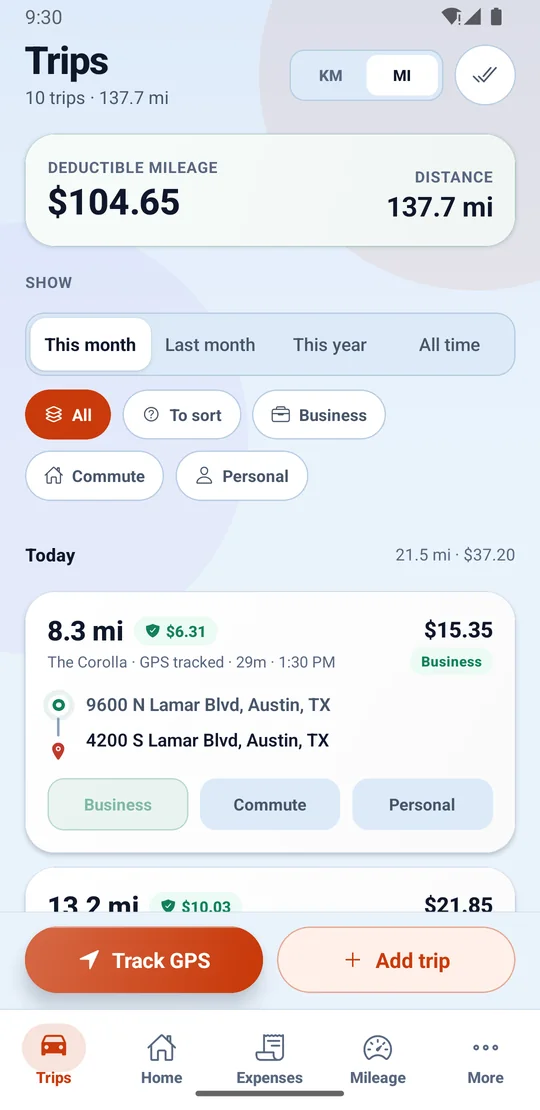
The Trips screen for a month, with deductible mileage and total distance at the top, filters for business, commute and personal, and a GPS-tracked trip showing its distance, deductible value, vehicle, start and end addresses and one-tap Business, Commute or Personal buttons.