Features · Tax estimates

A tax estimate that runs on your real tax year

Nobody withholds tax from gig income — the bill arrives later, sized by records only you kept. BrewGig keeps a running estimate from the earnings, expenses and mileage you already logged.

What this looks like in the app

Tax

A tax estimate that runs on your real tax year

Nobody withholds tax from gig income — the bill arrives later, sized by records only you kept. BrewGig keeps a running estimate from the earnings, expenses and mileage you already logged, so the money is set aside before the deadline finds you.

  • Estimates follow your country’s actual tax year — April to April in the UK, for example — not a calendar assumption.
  • Quarterly or instalment schedules appear where your jurisdiction uses them, so the next deadline is never a surprise.
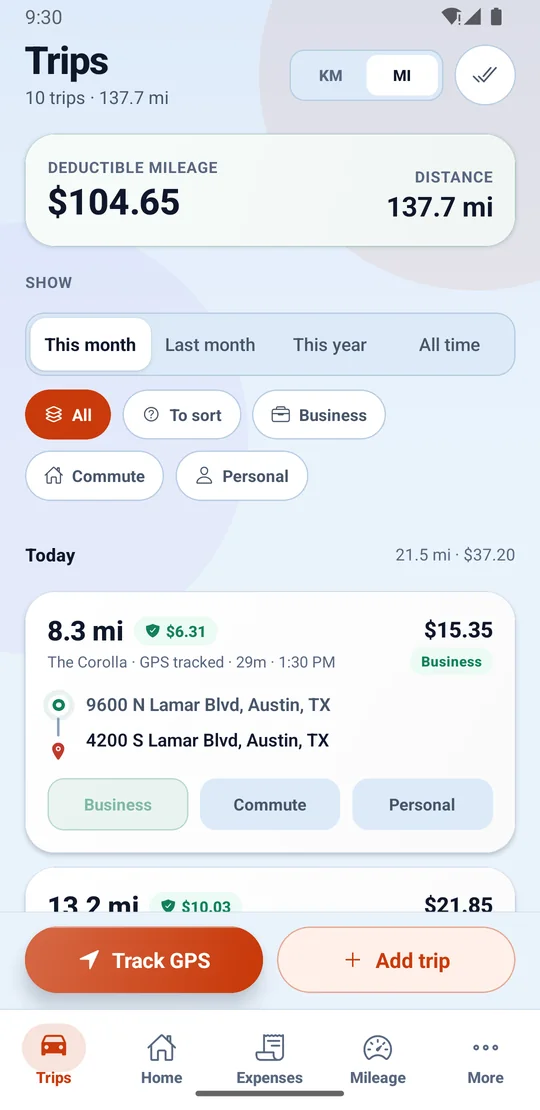
  • Mileage and expense deductions flow in from the same records automatically — nothing is entered twice.
  • It is an estimate to plan and set money aside with, and it says so — never a filing, never tax advice.

An estimate to plan with, not tax advice — and the app says so too. Figures are examples.

What is your mileage actually worth?

Most gig workers underclaim because nobody logged the miles. Move the sliders — or type your own figures — to see the deduction you may be leaving on the table.

150 mi
US$120.00
US$42,000.00

Figures are shown in USD, the currency for United States. In the app each record carries its own currency.

Estimated mileage deduction

US$5,791.45

7,800 mi a year


Total deductionsUS$7,231.45
Taxable after deductionsUS$34,768.55
Effective tax rate15.7%
Estimated tax savedUS$1,828.23

An illustration using IRS-style federal rules — Schedule C, self-employment tax, the single standard deduction and marginal brackets. It ignores state tax, credits and itemised deductions, and is not tax advice. In the app the figures come from your own records.

Start tracking free

Your log starts with the next drive.

Install BrewGig, allow location access, and drive. On Pro and above your first trip appears on its own, with its deductible value already worked out.

The Trips screen for a month, with deductible mileage and total distance at the top, filters for business, commute and personal, and a GPS-tracked trip showing its distance, deductible value, vehicle, start and end addresses and one-tap Business, Commute or Personal buttons.