 Brew
BrewBusiness
Shaped for delivery work. Stopping at a door does not end the trip, the walk to the customer never counts as distance, and the finished trip files itself as Business.
Features · Automatic mileage tracking
A mileage tracker with no start button and no app to open at the kerb: drives are detected in the background, ended where you parked, filtered for GPS noise and kept with the route behind them. The result is a mileage log built to be read back by the IRS or HMRC rather than merely totted up. Automatic tracking runs on Pro and above.
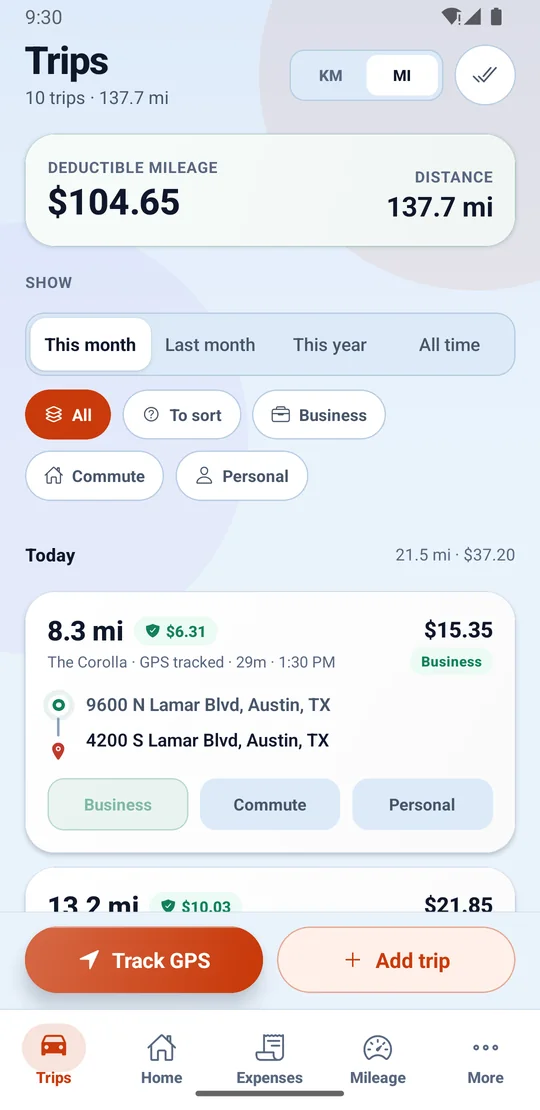
No start button before every trip, no app to open at the kerb. On Pro and above, drives are detected, measured and logged in the background while the phone sits in your pocket — a live status pill reads Recording · 2.4 km as you go, so you always know it is on the job.
Automatic tracking is on the paid plans, from Pro upwards. How many automatic trips a day each plan allows is on the pricing page, read from the configuration the app enforces. On the free plan you enter trips yourself.
Shaped for delivery work. Stopping at a door does not end the trip, the walk to the customer never counts as distance, and the finished trip files itself as Business.
Off-shift driving. Trips close quickly when you park and file themselves as Personal, so your own errands never pad the business log.
For days that are both. Every drive is recorded and lands in a review queue — swipe right to file it as Business, left as Personal.
Anything left unsorted clears with one swipe — right for Business, left for Personal. A week of driving is a minute of sorting, not an evening.
Some phones quietly kill background trackers to save battery. BrewGig detects the battery-optimisation and permission settings that do it, and fixes them from inside the app — before they cost you a week of drives.
Automatic is worth nothing if the result would not survive a question. Each trip is recorded the way a tax authority wants to read it back — and the log that puts it all together opens on Pro and above.
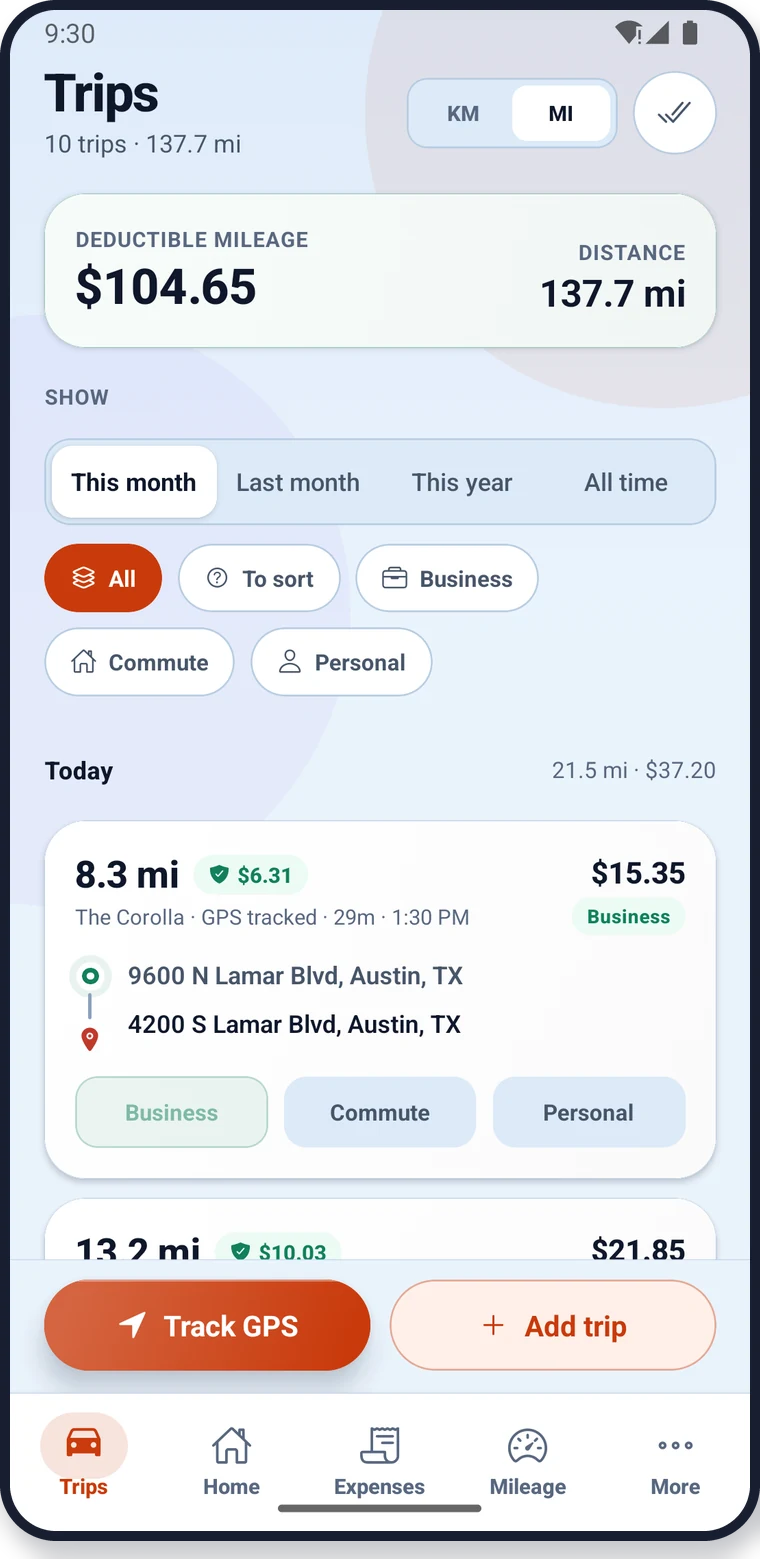
A drive is money in two directions: what the job paid, and what the distance takes off your taxable income. BrewGig keeps both on the trip itself, so neither gets lost.
Automatic tracking, on Pro and above, means there is nothing to press. The app watches the phone’s motion and location in the background and decides for itself that a drive has started — you do not open it, and you do not remember it at the kerb, which is the moment every manual tracker loses its mileage.
The same judgement closes the trip. A drive ends where the vehicle actually parked, so the walk to the door is not counted as distance, and a pause at a light or a collection point does not chop one delivery run into six trips. GPS noise — the drift a phone reports while it is stationary between tall buildings — is filtered out before the trip is saved, because noise inflates a distance in the direction that is hardest to defend.
What is kept is a trip record rather than a number: when it started and ended, where it started and ended, how far it went, and the route it took. The route is the evidence behind the figure, and it is the thing an odometer reading can never produce afterwards.
A mileage deduction is only as good as the record behind it. Both the IRS and HMRC want much the same four things per journey: the date, the distance, where you went, and the business reason you went there — written down at the time rather than reconstructed from memory in April. IRS Publication 463 is explicit that a log kept as you go carries more weight than one written up later, and a Self Assessment return rests on records you can still produce if anyone asks.
That is why BrewGig records each trip as it happens instead of totting up a monthly total. A business purpose is captured per trip, the endpoints are kept, and the driven route sits behind the distance. Whether you claim by the standard mileage rate on Schedule C or by AMAP on a Self Assessment return, the log underneath is the same log — and where a country tapers its rate after an annual threshold, as the UK does, the calculation follows the band rules rather than multiplying everything by one figure.
Not every mile is deductible, and a tracker that logs all of them and leaves you to sort it out has just moved the work. BrewGig classifies as it records: put it in Business for a shift and finished trips file themselves as business; put it in Private for your own errands and they file as personal, with trips closing quickly at a stop so off-shift driving never pads the log.
Mixed is for a day that is both. Every drive is still recorded, and each one lands in a review queue where a swipe right files it as business and a swipe left as personal — a week of driving is a minute of sorting. Commuting is its own category for the reason that trips the point: the run from home to where you start work is usually not deductible, and a log that quietly counts it is a log that overstates a claim.
The real failure mode of every automatic mileage tracker on Android is not the GPS — it is the phone. Battery optimisation suspends background work to save power, a location permission granted only “while using the app” stops the moment the screen locks, and some manufacturers add their own app-sleep lists on top. The tracker does not crash or warn you. It simply logs nothing, and you find out at the end of the week.
So BrewGig checks its own running conditions rather than assuming them. It looks at the battery-optimisation exemption, the background location permission and the physical-activity permission it needs, tells you which one is missing in plain words, and opens the exact settings screen that fixes it. The Track screen also shows whether tracking is armed right now, so “is it on?” is a glance rather than a guess.
If you drive for DoorDash, Uber, Lyft, Instacart, Amazon Flex, Deliveroo, Just Eat or a parcel round, the miles the platform reports are not the miles you drove. A platform measures the delivery — pickup to drop-off — and stops counting. It does not count the drive to the zone, the miles between orders, the repositioning while you wait for the next ping, or the drive home at the end of a shift that started at a customer’s door.
Those unreported miles are usually the larger half of a day’s driving, and they are the half that only your own log can prove. A tracker that runs in the background from the moment you start working — which, on Pro and above, is what BrewGig does — captures them without asking you to remember; a manual one captures the ones you remembered.
Multi-apping makes the same point twice over. Working three platforms in one shift means three dashboards, none of which knows about the other two — while the mileage log underneath is one log, for one vehicle, over one day, which is exactly the shape a tax return wants it in.
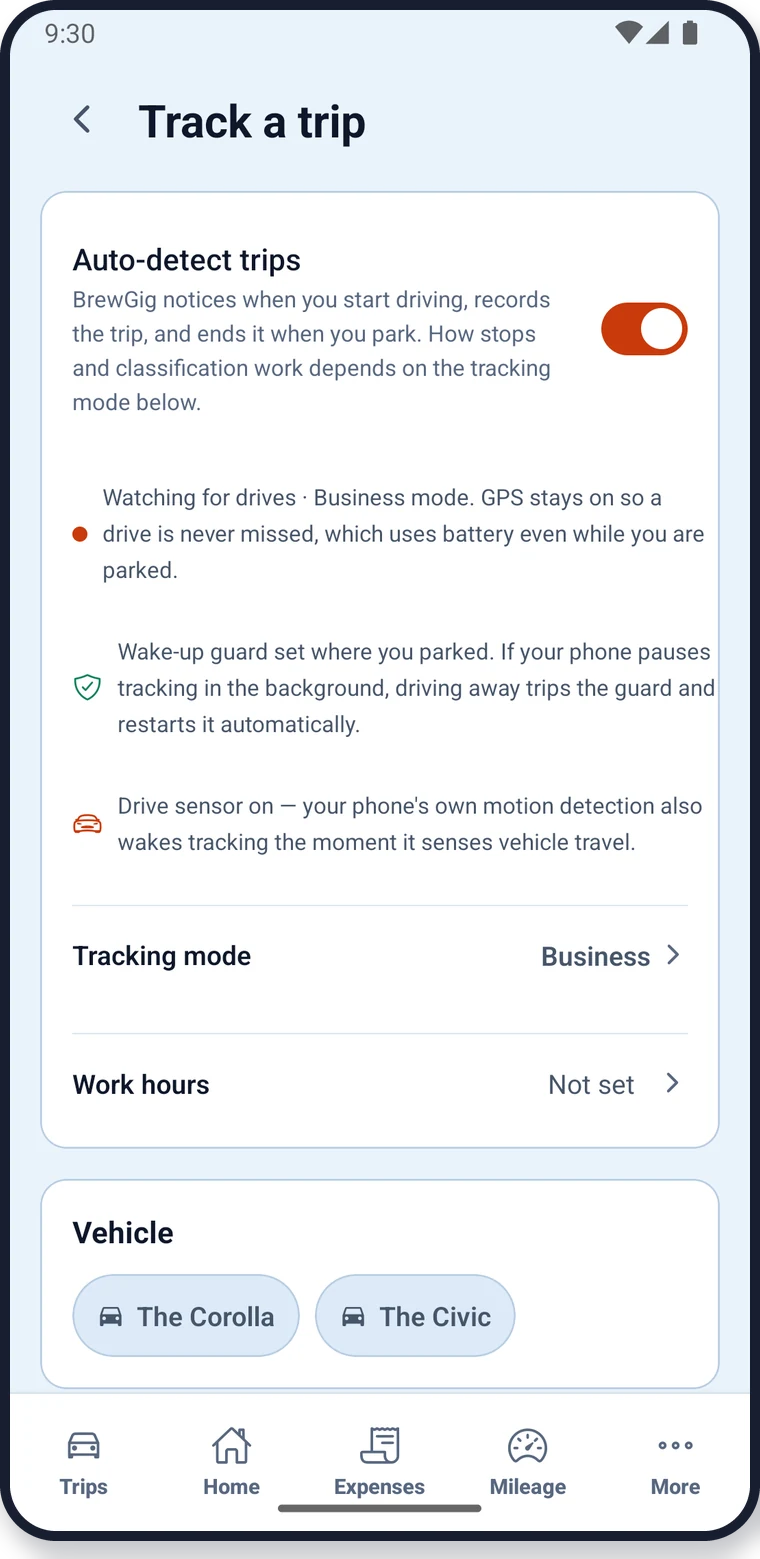
Install BrewGig, allow location access, and drive. On Pro and above your first trip appears on its own, with its deductible value already worked out.