Features · Your records, yours

Your records leave with you, whenever you say so

Four commitments, each enforced by something more durable than a promise on a marketing page.

Your records leave with you, whenever you say so

Four commitments, each enforced by something more durable than a promise on a marketing page.

  • Take it with you

    Excel on every plan

    A formatted workbook of everything you have logged, on the free plan too — leaving must never be the expensive option. Branded, printable PDF reports come with the paid plans.

    Covers
    Every dataset you keep here — trips, income, expenses, receipts, invoices, clients, vehicles and goals

  • Bring history in

    CSV import

    The history you kept elsewhere comes in with automatic column matching and a row-by-row preview, so you see exactly what will be written before anything is.

    Format
    CSV, with columns matched to fields automatically
    Preview
    Every row shown, and every problem flagged, before a single write
  • Enforced by the database

    Row-level security, everywhere

    Row-level security is on for every table, without exception. Tables that hold your records carry a policy tying each row to the account that owns it; the rest are shared reference data, or internal tables no signed-in query can read.

    Your records
    A policy on every row, keyed to your account
    Shared data
    Tax rates and currency lists — read-only for everyone
    Receipt images
    A private bucket, served only through short-lived signed links
  • One request

    Deletion that deletes

    Closing your account erases your records. One thing is kept on purpose: a one-way fingerprint of your email and the two facts it guards — that a free trial was used, and that an automatic refund was used. That is what stops a delete-and-sign-up-again loop farming both for ever.

    Erased
    Trips, expenses, invoices, clients, and the receipt images with them
    Kept
    A one-way fingerprint of your email — nothing readable
    Where
    From Settings in the app, or the deletion page linked below

Your log starts with the next drive.

Install BrewGig, allow location access, and drive. On Pro and above your first trip appears on its own, with its deductible value already worked out.

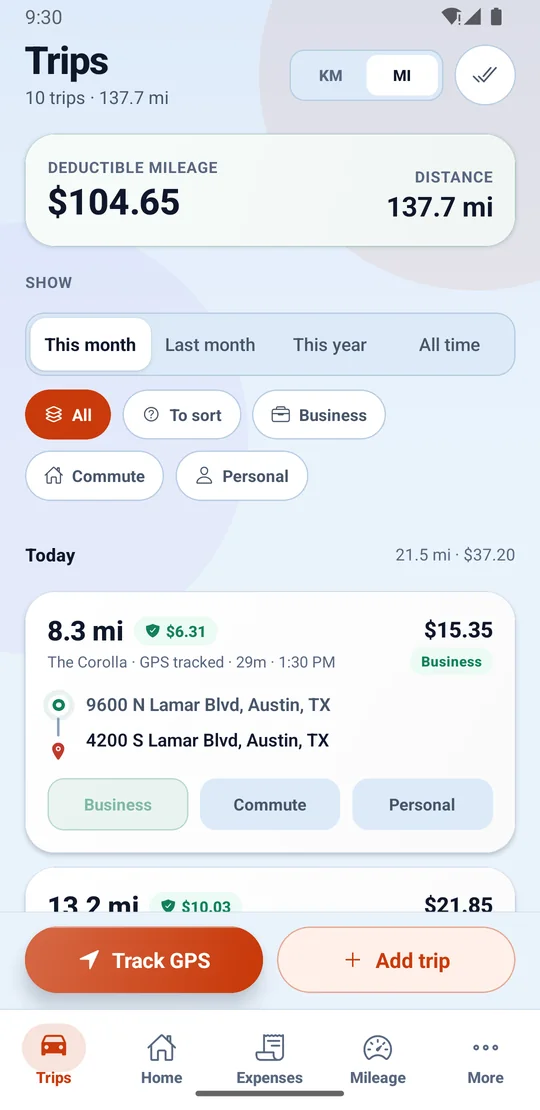
The Trips screen for a month, with deductible mileage and total distance at the top, filters for business, commute and personal, and a GPS-tracked trip showing its distance, deductible value, vehicle, start and end addresses and one-tap Business, Commute or Personal buttons.